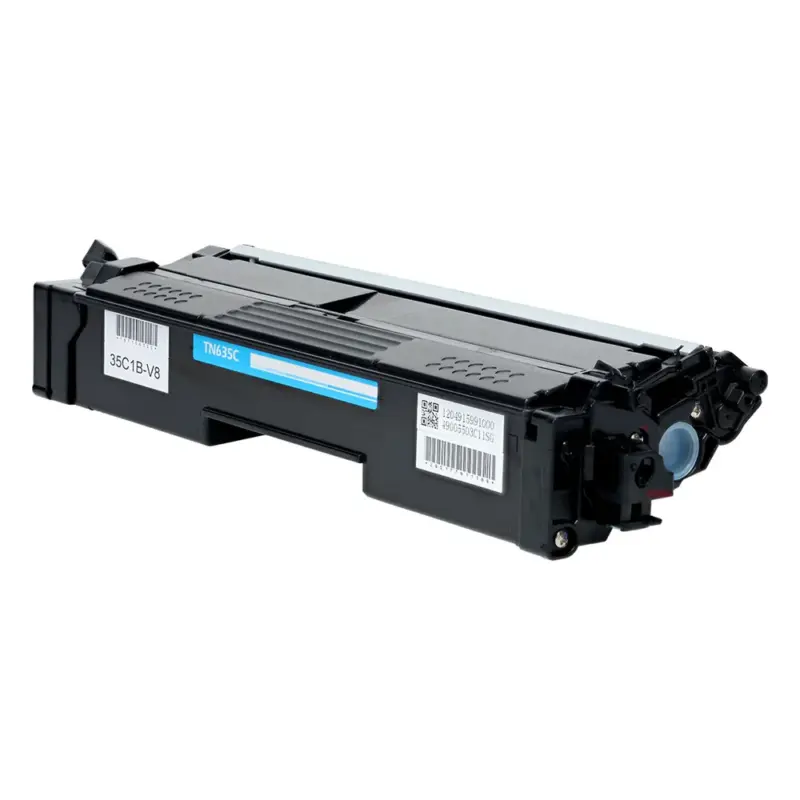
Compatible Brother TN635C Cyan Toner Cartridge (1,800 pages)
Replaces Brother TN635C · SKU TS-TN635C
1,800 pages, about 1.7¢ per page
Buying for the office? The price drops with quantity.
- 2 or more$25.08 eachsave 20%
- 4 or more$22.43 eachsave 28%
Applied automatically in the cart. The break is per cartridge.
Orders of $300 or more get $10 off at checkout.
We email a one-click reorder link when it's time. You only pay when you reorder.
- Free shipping over $30
- Lifetime satisfaction guarantee
- 90-day returns, including opened cartridges that are defective
- Printer damage protection on every cartridge we sell
This compatible TN635C prints about 1,800 pages at roughly 1.7¢ a page and replaces the genuine Brother TN635C. It fits the Brother HL-L8430CDW, Brother HL-L8430CDWT and Brother HL-L8570CDW and 4 other Brother models.
Will this fit my printer?
Fits 7 printer models. Pick yours to see everything else it takes.
- Brother HL-L8430CDWUses TN635BK, TN635C, TN635M +9
- Brother HL-L8430CDWTUses TN635BK, TN635C, TN635M +9
- Brother HL-L8570CDWUses TN635BK, TN635C, TN635M +9
- Brother MFC-EX575Uses TN635BK, TN635C, TN635M +9
- Brother MFC-L8730CDWUses TN635BK, TN635C, TN635M +9
- Brother MFC-L8930CDWUses TN635BK, TN635C, TN635M +9
- Brother MFC-L8970CDWUses TN635BK, TN635C, TN635M +9
Find your cartridge
or pick your printer
Specifications
| Replaces OEM number | Brother TN635C |
|---|---|
| Also written as | TN-635C |
| Color | Cyan |
| Rated yield | 1,800 pages (Approx. yield per ISO/IEC 19752 / 19798 at 5% coverage (letter/A4)) |
| Yield class | Standard yield |
| Cost per page | 1.7¢ at our price |
| Chip | Not published by Brother |
| Build | Confirmed with the supplier before launch |
| Facts checked | 2026-09-22 by Dan Whitaker, Print Technician |
Specs from acmtech.com.
How to install it
- Open the front cover and let the printer cool for a few minutes if it has been printing.
- Pull out the drum and toner assembly together, then press down the green lock lever and lift the old cartridge out of the drum.
- Unpack the new cartridge and rock it gently side to side five or six times to spread the toner evenly.
- Slide the new cartridge into the drum until the lock lever clicks.
- Slide the green tab on the drum from left to right three times to clean the corona wire, then return it to the home position.
- Put the assembly back in, close the cover, and print a test page.
If something goes wrong
The display still says replace toner
Brother printers count pages rather than measure toner, so the message stays until the counter is reset. Open the front cover, hold the control panel steps for your model, and the count clears.
Full guidePages come out blank or very light
Nine times out of ten the sealing tape is still in place or the cartridge needs rocking to spread the toner. Pull the cartridge, check the tape, rock it gently, and reinstall.
Full guideStreaks or a repeating mark down the page
Streaks usually come from the drum, not the toner. Clean the corona wire if your printer has one, and check the drum count before replacing the cartridge again.
Full guideQuestions about the TN635C
How many pages does a TN635C print?
About 1,800 pages. The rating follows Approx. yield per ISO/IEC 19752 / 19798 at 5% coverage (letter/A4). That is a rated average, so heavy graphics use toner faster than plain text.
What if it does not work in my printer?
Send it back. Returns are open for 90 days and that includes opened cartridges that are defective. Shipping is free both ways.
5 reviews for Compatible Brother TN635C Cyan Toner Cartridge
Only logged in customers who have purchased this product may leave a review.
Would reorder
Most of our printing is plans. Toner is not exciting, but the cartridge has been uneventful, which is exactly what i wanted. It did the job. We use plain copy paper most of the time.
Back to printing
I bought this because we were down to the last cartridge. For us it’s mainly BOLs. We don’t have time to babysit a printer. It has handled our normal volume without drama. I would buy another.
Would reorder
I handle most of the ordering for the sales tower. I wasn’t sure what to expect. We mostly use it for service paperwork. It seated correctly on the first try. It did the job. The printer sits close enough that bad print quality is obvious.
Does the job
We mostly use it for menus. The printer recognized it immediately. It seated correctly on the first try. For our use, this has been a good choice.
Fine for daily use
I handle most of the ordering for the operations desk. We mostly use it for BOLs. Pages look crisp and readable. I checked a handful of pages after the swap and the density looked consistent from top to bottom. So far I’m pleased.